

WeatherGO: The Weather App That Shows Fahrenheit and Celsius at the Same Time
If you've ever lived in another country — or even just tried to text someone abroad about the weather — you already know the problem. Someone says "it's 25 out" and you have no idea if that's beach weather or bring-a-coat weather.
That's exactly why WeatherGO exists.
What Is WeatherGO?
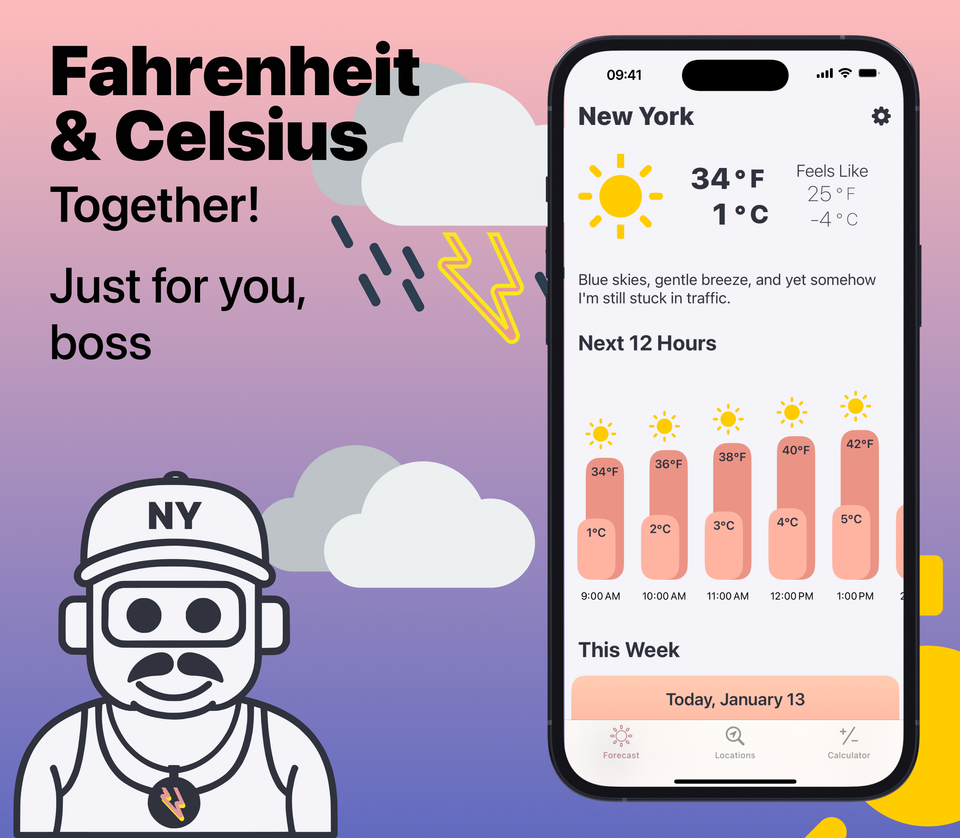
WeatherGO is a free iOS weather app that displays both Fahrenheit and Celsius temperatures at the same time — no toggling, no converting, no mental math. It was built by an American expat splitting time between Europe and the US who got tired of googling "what is 18 celsius in fahrenheit" every single morning.
If you're an expat, a digital nomad, a frequent traveler, or someone with family and friends in other countries, WeatherGO was built specifically for you.
Why Show Fahrenheit and Celsius Together?
Most weather apps make you pick one temperature unit and stick with it. That's fine if your whole life happens in one country. But if you live between places — say, New York and Berlin, or London and Los Angeles — you need both systems to actually make sense of the temperature.
WeatherGO shows Fahrenheit and Celsius side by side on every screen, so you always know exactly what the weather means in the unit you think in and the unit the people around you are using. No settings to flip. No second app. Just both, right there.
Meet JEFF: Your AI Weatherman
WeatherGO comes with JEFF, an AI-powered weatherman who thinks he grew up in New York City. He delivers your forecast like the guy behind the counter at a deli — fast, direct, maybe a little inappropriate, but he means well.
JEFF calls you "boss," "chief," and "my guy." He isn't a polished TV meteorologist with a cool name. Clouds rolling in? "Sky's in a mood. Don't take it personal, chief." Thunderstorms? "Sky's got more drama than a subway at rush hour." Fog so thick you can't see? "Can't see a damn thing, my guy. Hope you know the streets by heart."
That's right, my guy — JEFF is the AI weatherman you didn't know you needed.
Key Features of WeatherGO
Dual Temperature Display
See Fahrenheit and Celsius simultaneously on every screen. No toggling required — both units are always visible, making it the ideal weather app for anyone who thinks in more than one temperature system.
Clean, Fast Design
Open the app, see the weather. Current conditions, hourly forecast, and the week ahead — all without digging through menus. WeatherGO is designed to give you the information you need in seconds.
Accurate Weather Data
WeatherGO pulls from trusted weather data sources to deliver reliable forecasts, current conditions, and weather alerts you can actually count on.
Works Anywhere in the World
From Brooklyn to Berlin, Athens to Auckland — WeatherGO delivers local weather conditions and alerts wherever you are. The app automatically adjusts when you travel, so your forecast always matches your actual location.
Home & Lock Screen Widgets
Add WeatherGO widgets to your iPhone home & lock screen for an at-a-glance view of both Fahrenheit and Celsius temperatures without even opening the app. JEFF shows up on your widgets too — because your need more JEFF in your life.
Local Weather Alerts
Get local severe weather alerts and notifications tailored to your location. Nobody likes getting caught in a storm unprepared, and JEFF will definitely let you know about it — probably with some commentary.
Who Is WeatherGO For?
WeatherGO is the best weather app for:
- Expats living abroad who still think in their home country's temperature unit
- Digital nomads who move between countries regularly
- Frequent travelers who need weather info that makes sense in any country
- Bilingual and multicultural families where different members use different temperature systems
- Anyone who's ever stared at a foreign thermostat like it was written in hieroglyphics
How Is WeatherGO Different From Other Weather Apps?
Most weather apps treat temperature units as an either/or setting buried in preferences. WeatherGO was designed from the ground up around the idea that millions of people actually need both — and that switching back and forth is a terrible experience.
Add JEFF on top of that, and you've got a weather app that's actually fun to check. No generic forecasts. No robotic tone. Just a fast-talking AI weatherman who gives it to you straight, boss.
Download WeatherGO
WeatherGO is available as a free download on the App Store. Get your dual Fahrenheit and Celsius forecast, meet JEFF, and stop doing temperature math forever.
JEFF's already got your forecast ready, chief. Don't keep him waiting.
FAQ — Frequently Asked Questions About WeatherGO
Does WeatherGO show Fahrenheit and Celsius at the same time? Yes. WeatherGO displays both Fahrenheit and Celsius temperatures simultaneously on every screen. There's no need to toggle between units, both are always visible.
What/Who is JEFF in WeatherGO? JEFF is WeatherGO's AI-powered weatherman. He things he grew up in New York City (born and raised!) and he delivers forecasts accordingly - direct, witty, a little inappropriate, but always honest. He may call you "boss," "chief," "bro", or "my guy" but he gives you the weather how it is.
Is WeatherGO free? WeatherGO is free to download on the App Store with optional premium features available through a subscription.
Does WeatherGO work internationally? Yes. WeatherGO provides weather data for locations worldwide and automatically updates when you travel to a new location.
Is WeatherGO available on Android? Unfortunatly WeatherGO is currently available on iOS (iPhone) only. It can be downloaded from the App Store.
Does WeatherGO have widgets? Hell Yes! WeatherGO offers home screen widgets for iPhone that display both Fahrenheit and Celsius temperatures at a glance, with your boy JEFF included.